JourneysEarly access
A message that keeps the conversation going.
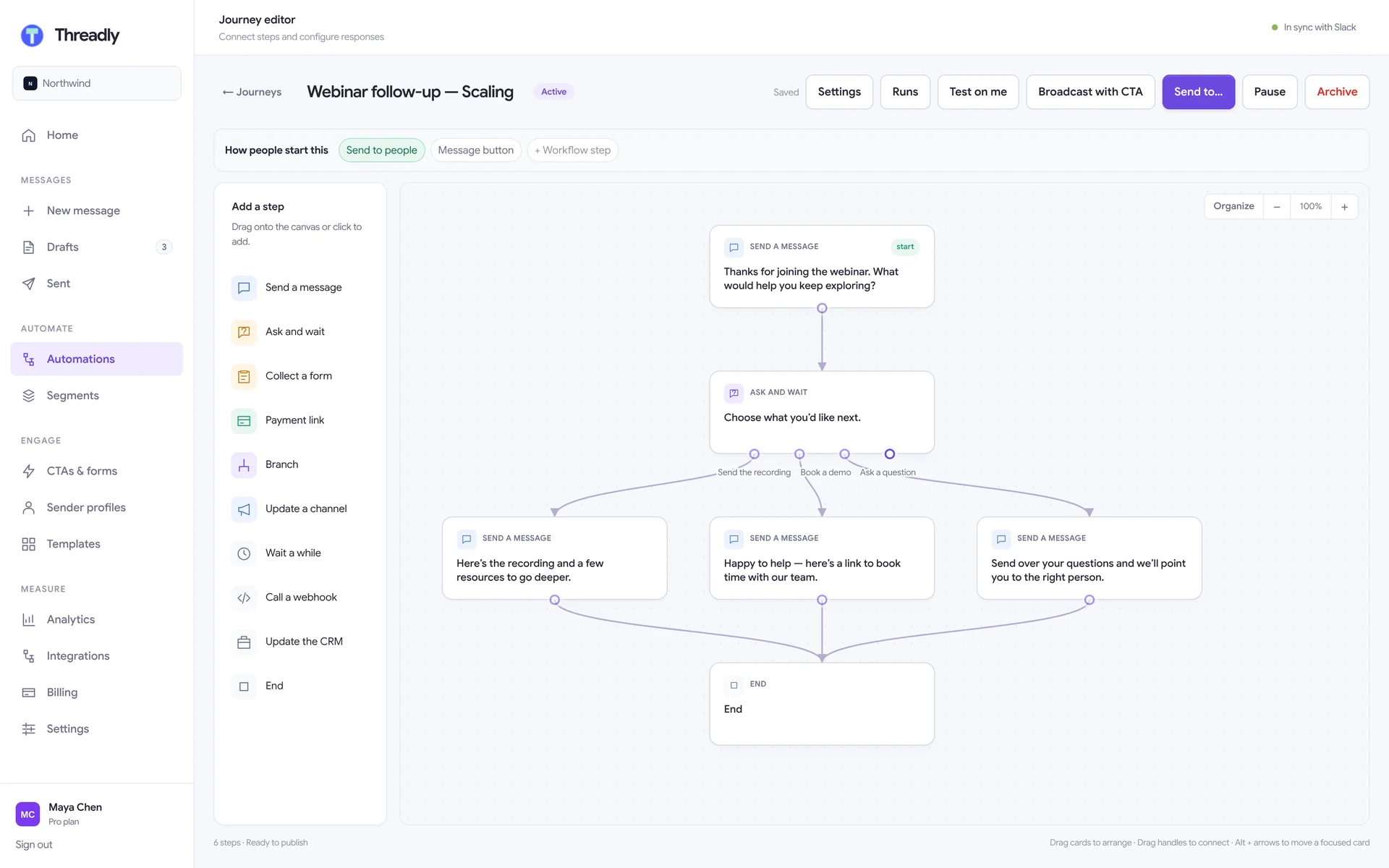
Ask a question, wait for the answer, and send each person down the right path. Journeys are branching, multi-step conversations that run inside Slack — and tell your team the moment someone is ready.
Why journeys
“We sent three messages” vs. “they told us what they need.”
A workflow is a straight line: it fires on a trigger and runs every step. A journey stops on the person it was sent to and carries on differently depending on what they did. The prospect says they want 500 seats — they get the enterprise pay link, and the deal channel knows.
Workflow
Trigger → step → step → done. Great for “when X happens, post Y”.
Journey
Ask → wait → branch → act. Every person gets the path their answers earn.
Building blocks
Ten steps. Endless paths.
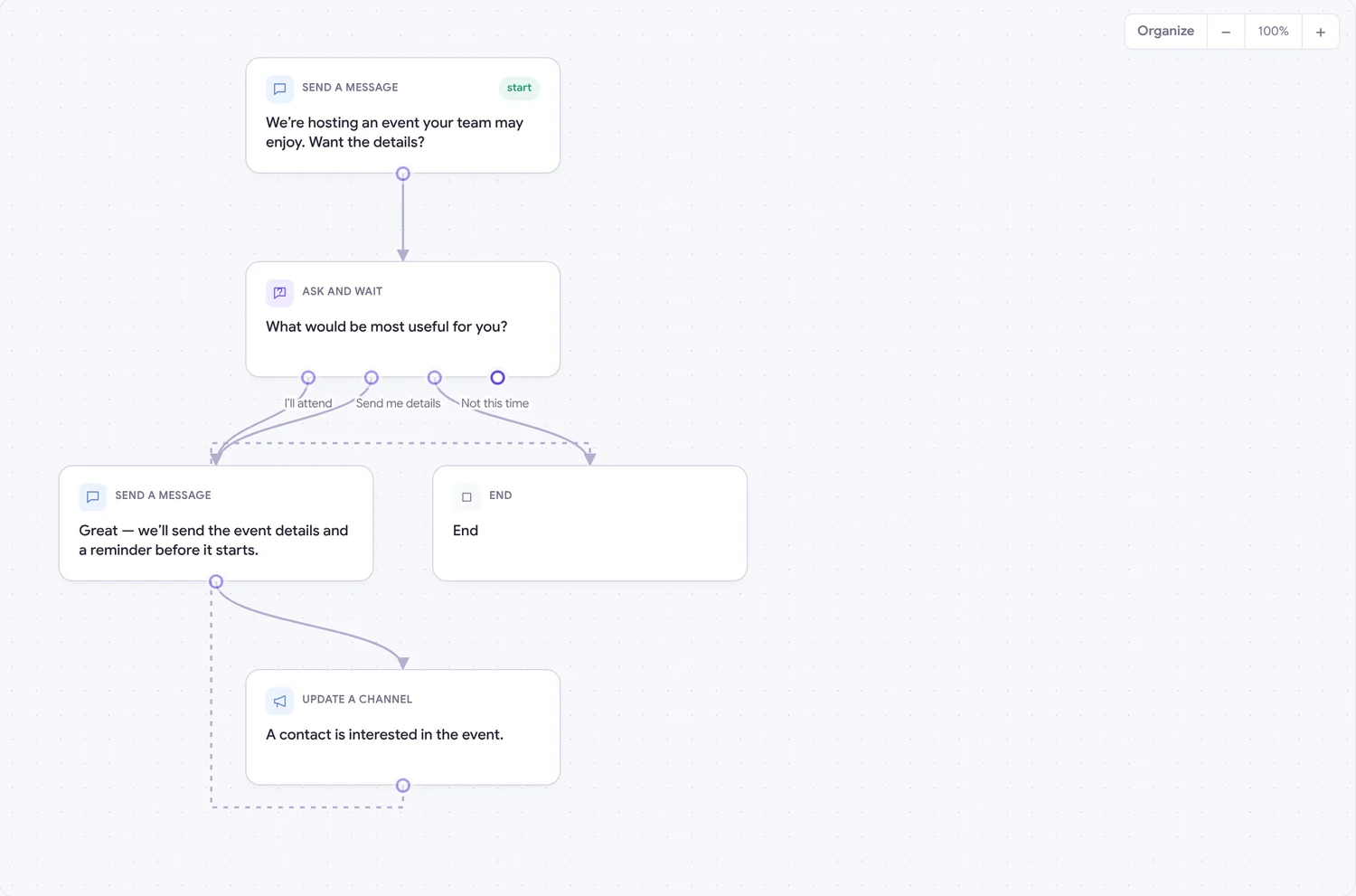
Drag steps onto the canvas, connect the exits, and publish. Threadly checks the flow for dead ends before you go live.
Send a message
Post text, buttons or an image to the person.
Ask and wait
Offer choices and pause until they pick one — or follow up if they don’t.
Collect a form
Open a Slack form and continue with their answers.
Branch on an answer
Route people with rules on anything they’ve said so far.
Update a channel
Tell your team in their channel when someone is ready.
Wait a while
Pause for minutes or up to 90 days, then carry on.
Send a payment link
A per-person pay link, and the journey waits for it.
Call a webhook
Send the run to any system you already use.
Update the CRM
Write answers back to HubSpot fields.
End the journey
Finish the run and record the outcome.
Every person, tracked
Each send is a run. See who entered, where they are now, and what they last answered — the screen a rep lives in.
Clicked once, counted once
Buttons carry signed tokens and a double-click advances the journey exactly once — nobody is charged or messaged twice.
Same journey, Slack or web
Build on the web canvas or in the Slack builder. Both edit the same journey, and workflows can start one as a step.
Start from a template
Nine journeys, ready to clone.
Each one opens on the canvas so you can change the words, add steps, and publish.
Lead qualification
Turn a warm reply into a qualified opportunity with a few focused questions.
Customer onboarding
Welcome new customers, check their setup, and offer help before they get stuck.
Webinar follow-up
Turn webinar engagement into a useful next step while the conversation is fresh.
Event promotion
Invite the right people, capture their interest, and keep attendance moving.
Partnership outreach
Start a partnership conversation and route promising replies to your team.
Post-call follow-up
Send the recap, ask for the next step, and route the follow-up to the right person.
Feedback loop
Ask for a quick pulse, acknowledge the response, and keep the conversation going.
Event follow-up
Collect intent after an event and give every attendee a clear next step.
Post-news follow-up
Share an update, learn what caught their attention, offer one next step.
Want Journeys in your workspace?
Journeys are rolling out to workspaces in early access. Install Threadly today and tell us you want in — we’ll switch it on.
No credit card required · Set up in minutes