Slack messages that
people act on.
Threadly turns a Slack message into something your customers, partners and team can respond to — buttons, forms, bookings and guided journeys — sends it to exactly the right channels, and shows you who acted.
Works in Slack and on the web · Free plan · No credit card


Trusted by hundreds of teams


Slack + Web
Build and send right inside Slack,
or from your browser.
Create interactive messages, segments, automations and journeys without leaving Slack — or open the web app when you want more room. Anything you start in one place is waiting for you in the other.
Where your audience responds — and where you can send, too.

Always in sync
Change a draft, segment or automation in one place and it updates in the other — the web app shows “In sync with Slack” live.
Sign in with Slack
No new accounts or passwords. Your workspace, channels and teammates are already there.
Nothing to install for recipients
People you message only ever see Slack. Clicks, votes and bookings all happen in the message.
Already installed? Open the web app →
The platform
One app for every message that needs a response.
Threadly replaces copy-pasting into dozens of channels, chasing replies, and guessing what landed.
Interactive messages
Every message comes with a next step.
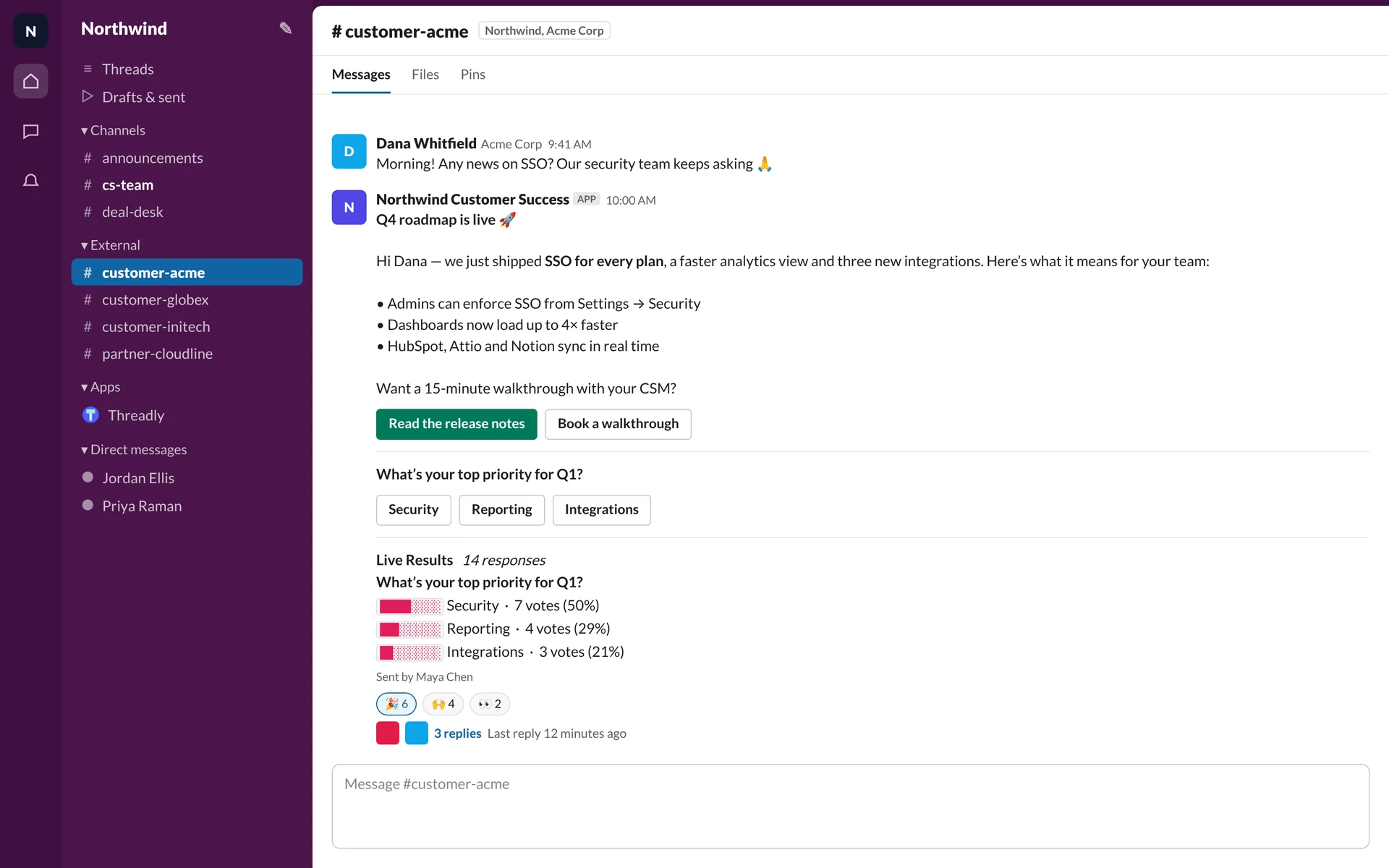
Attach a call to action people can take without leaving Slack. Threadly tracks every click by channel and by person, so “did they see it?” finally has an answer.
- Link buttons with per-person click tracking
- Forms and polls that open as native Slack modals
- Booking buttons for Calendly, Cal.com, SavvyCal and HubSpot
- Sender profiles so updates come from your brand — or from you

Segments
Send to the right 42 channels, not all 400.
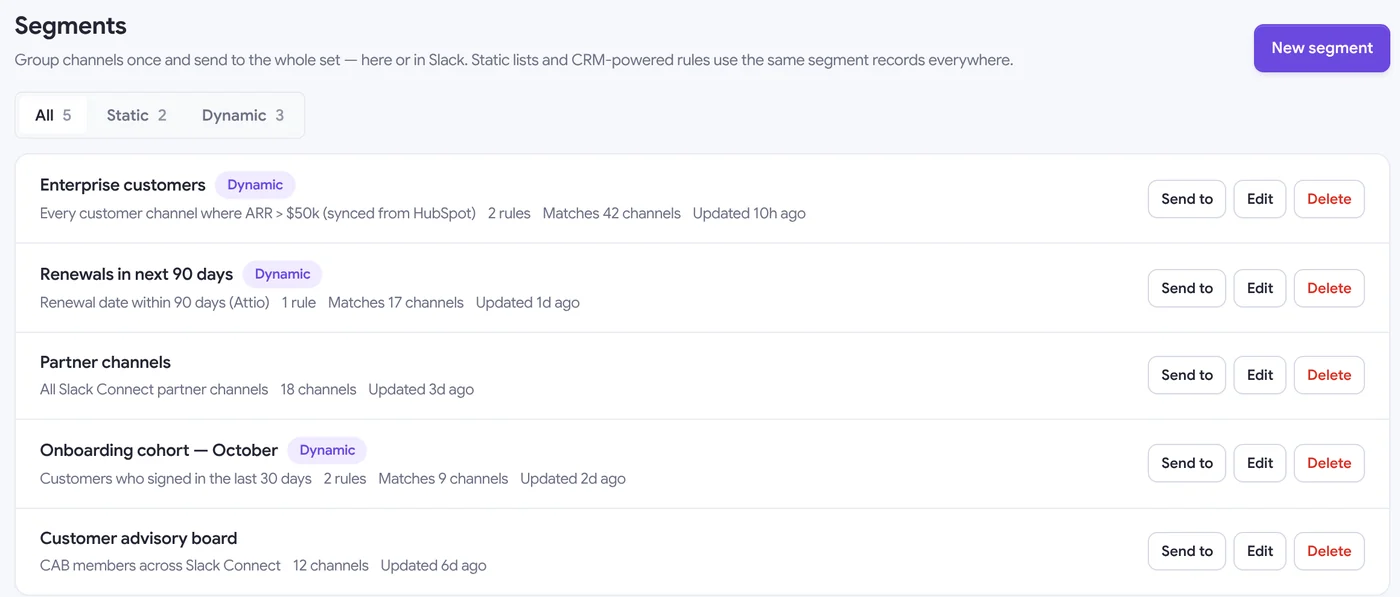
Group channels once and reuse them everywhere. Dynamic segments read your CRM — ARR, lifecycle stage, renewal date — and keep themselves up to date as accounts change.
- Static lists or dynamic rules powered by HubSpot, Attio and Clay
- Works across Slack Connect customer and partner channels
- Preview exactly which channels match before you send
- Shared between the web app and Slack

JourneysEarly access
Conversations that branch on what people choose.
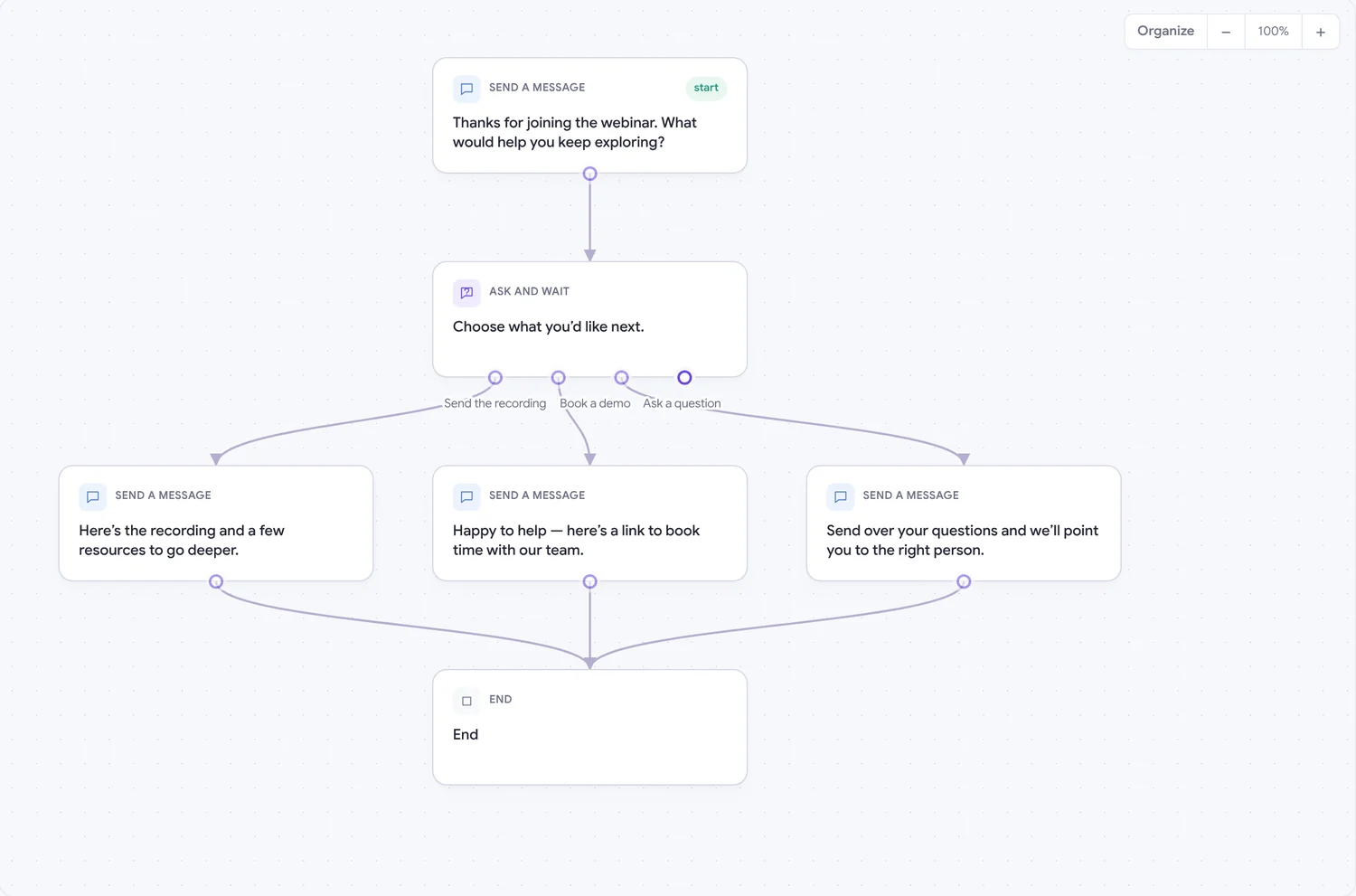
A journey is a message that keeps going. Ask a question, wait for the answer, and send each person down the right path — then tell your team in their channel when someone is ready.
- Drag-and-drop canvas: messages, choices, forms, waits and branches
- Payment links, webhooks and HubSpot updates as steps
- Each run tracked per person — see where everyone is
- Start from a template: onboarding, event follow-up, lead qualification

Automations
The update you send every week, sent for you.
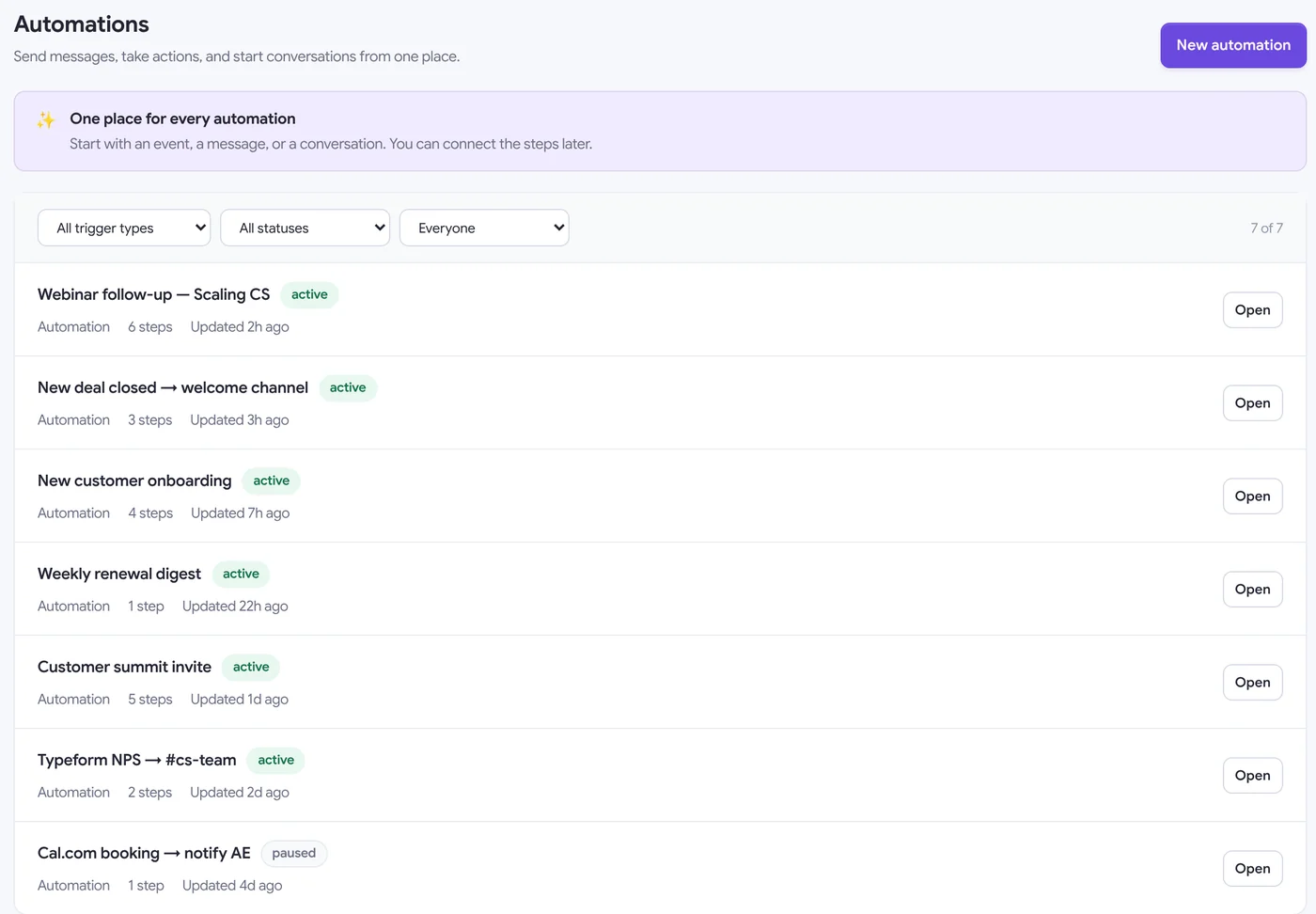
Fire a message when a HubSpot deal closes, a Typeform is submitted or a meeting is booked — or on a schedule. Workflows and journeys live in one list, with owners and status at a glance.
- Triggers from HubSpot, Typeform, Cal.com, Zapier, webhooks and schedules
- Create channels, post messages and start journeys in one flow
- Choose which days a workflow runs, pause any time
- Clone, filter by owner and control who can edit

Analytics
Know who engaged — not just how many.
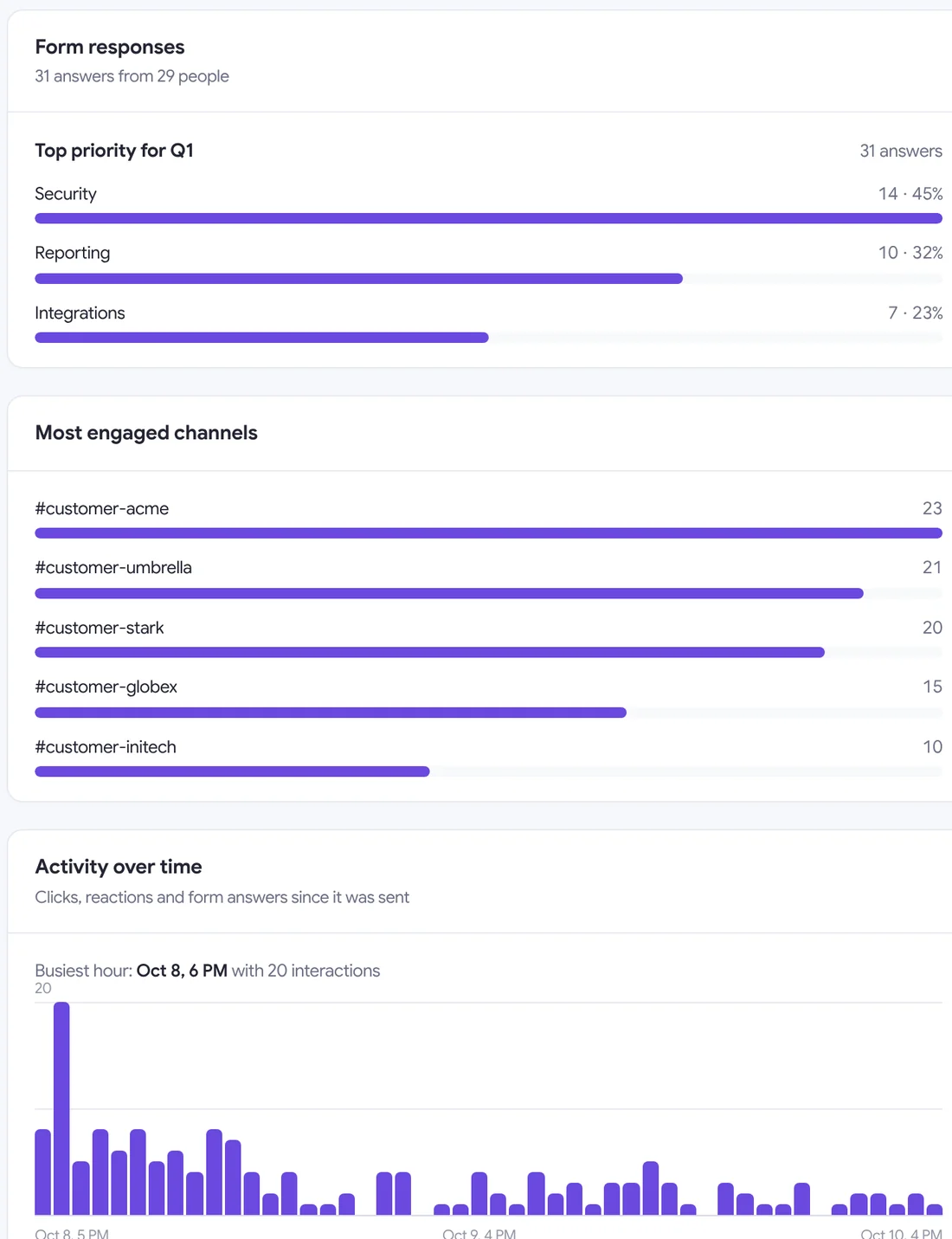
Every send gets its own report: delivery by destination, the most engaged channels, form answers broken down by option, and activity over time. Weekly reports land in Slack automatically.
- Clicks, reactions, thread replies and form responses
- Per-channel and per-person breakdowns
- Form answers charted by option
- Weekly message reports delivered to Slack

Broadcasts
One message to hundreds of channels, DMs or Slack Connect partners.
Forms & polls
Native Slack modals. Import Typeforms in a click.
Scheduling
Send later in any timezone, or on a recurring schedule.
Segments
CRM-powered channel groups that update themselves.
Journeys
Branching, multi-step conversations with per-person runs.
Analytics
Engagement per channel and person, plus weekly reports.
Who it's for
Built for teams who live in Slack—
but outgrew it.
Threadly is used by customer success teams, partnerships teams, RevOps teams, sales teams, support teams, internal operations teams, agencies, and communities that manage many Slack channels at once.
Customer Success
Send QBR invites, renewal reminders, adoption nudges, and NPS surveys with built-in CTAs and forms — to every customer Slack channel at once. Track who clicked and who needs a follow-up.
- Monthly health-check check-ins
- Renewal reminder campaigns
- NPS surveys in Slack
Partnerships
Keep every partner channel updated with enablement content, announcements, and check-in requests — without manually posting in each one.
- Partner enablement updates
- Co-sell opportunity alerts
- QBR booking links in Slack
RevOps / Operations
Sync CRM data to build dynamic Segments, automate recurring Slack workflows, and measure engagement across every message sent.
- HubSpot-powered segmentation
- Recurring workflow automation
- Cross-channel analytics dashboards
Support / CX
Send proactive outage updates, escalation notices, and CSAT surveys across all customer channels simultaneously. Real accountability, real response rates.
- Incident update workflows
- CSAT surveys via Slack forms
- Escalation channel alerts
Sales Teams
Reach every deal channel or prospect workspace with personalized messages and embedded meeting booking links. One send, zero copy-paste.
- Multi-deal update sends
- Demo scheduling via Slack
- Pipeline nudge automation
Internal Operations
Send all-hands invites, policy updates, and IT announcements with a click-to-RSVP button — to every department channel at once. Stop posting the same thing over and over.
- All-hands invite RSVPs
- Policy update announcements
- HR survey campaigns
Agencies & Communities
Manage client Slack workspaces or large communities from one dashboard. Send tailored updates to each client channel without building a separate workflow per client.
- Client workspace updates
- Community event announcements
- Onboarding message sequences
Data & Analytics Teams
Use Threadly's click tracking and form response data to measure which Slack communications actually drive action — and which ones get ignored.
- Message engagement reporting
- A/B test Slack copy
- Form response exports
Teams use Threadly when
Slack starts to break.
From partnerships to product marketing—teams that live in Slack.
"We use Threadly and it's incredibly useful. Everyone who works with their customers in Slack should be using this."

"Working in partnerships at a SaaS company, I have dozens and dozens of Slack Connect channels with our agency partners. Threadly has been an awesome means of distributing product updates to all my partners in one fell swoop - no more copy/pasting the same update over and over. The founder is a beast."

"Gone are the days of asking someone on the team to share the news in different connected partner and customer channels. Just use @TryThreadly."

Plays nicely with your stack.
Connect Slack, CRM, and schedulers so every interactive message stays in sync with how you already work.
Some integrations are available on the Pro plan.









Send a message people actually answer.
Install Threadly, attach a button or a form, and send it to the right channels in under a minute. Free to start.
No credit card required · Set up in minutes
Still deciding? Ask the AI you already trust.
One tap opens your favorite model with a sharp, ready-to-send prompt about Threadly—what it is, who it wins for, and whether it fits your stack.
What is Threadly?
Threadly is an app for Slack that lets teams attach interactive forms, buttons, booking links and branching journeys to any Slack message, target it with CRM-powered segments, automate follow-ups, and track engagement per person — sent to as many channels or DMs as needed, in Slack or from the Threadly web app. Built for customer success, partnerships, RevOps, sales, support, and internal operations teams.
FAQ
Common questions about Threadly
Everything you need to know about interactive Slack messages, forms, scheduling, and analytics.